



WholesaleX does role-based wholesale pricing, and does it well. The case for moving shows up when your buyer stops being a person and becomes an organisation: several people ordering on one account, spend limits and approval, pay-on-account terms with a real credit ledger, quotes, VAT validation. That’s the ground B2B Suite is built on — and it’s one plugin with a free core, not a stack of add-ons.
The worry with any switch is the same one: will I lose my data? The honest answer is no — and you get to prove it to yourself before you commit. The importer runs as a dry run first, it never writes back to WholesaleX, and it’s safe to run twice. Nothing changes until you say so.
This guide walks the whole move, step by step, using the importer built into the free B2B Suite plugin. You don’t need to spend anything to migrate and check your prices.
TL;DR
- The importer is in the free plugin: B2B Suite → Settings → Import. Pick WholesaleX as the source.
- It reads WholesaleX straight from WordPress storage (options, user meta, post meta and its quote posts), so WholesaleX doesn’t need to be active and nothing is ever written back to it.
- Customer roles, buyers, approval status, pricing rules and tiers, min/max quantity, buy-X-get-one, tax exemption, shipping access, sub-accounts, and request-a-quote all come across automatically.
- Wallet balances, max-spend caps, price-visibility rules and custom registration fields need a manual step — each one is called out by name in the report, so nothing goes missing quietly.
- Every import is a dry run first; nothing is written until you confirm. Running it again updates instead of duplicating, so you can import now and re-import at switchover.
- The free plugin includes one customer group. If you have several wholesale roles, run the import with Pro active so every group comes across in one pass. Pro-domain data imports now and switches on when you upgrade.
What the importer actually does
Before you touch a setting, it helps to know how the migration is built — because that’s what makes it safe to try on a live store.
It reads, it doesn’t rewrite. The importer reads WholesaleX’s data from where WordPress already keeps it: plugin options, user meta, post meta, and its quote posts. It only ever writes into B2B Suite’s own groups, rules and tables. WholesaleX’s data is left exactly as it is.
WholesaleX doesn’t need to be active. Because the data lives in WordPress storage, the import works whether the WholesaleX plugin is switched on or off.
Every run is a preview by default. The import shows you the groups, customers, rules, companies and quotes it would create, plus a warning for every record it can’t map cleanly. Nothing is written until you confirm.
Running it twice is safe. The importer records a map of “this WholesaleX record became this B2B Suite record.” Run it again and it updates those same records instead of creating duplicates — which is exactly what you want when you import early, keep selling on WholesaleX for a week, then re-import right before the switchover.
That combination — read-only towards WholesaleX, dry run first, idempotent — means you can run the whole thing on your live store today and decide afterwards.
What comes across automatically
Most of your setup migrates in one pass, no manual work:
- Customer roles → customer groups. Each WholesaleX role becomes a B2B Suite customer group. WholesaleX’s built-in
guestandb2croles are skipped — they aren’t real trade groups. - Buyers and their role. Every user is placed into the group that matches their role.
- Approval status. Whether an account is approved or still pending carries over.
- Pricing rules and quantity tiers. Percentage, fixed-amount and fixed-price rules come across, including tier breaks.
- Minimum / maximum quantity and minimum order value. Role restrictions become quantity rules.
- Buy-X-get-one (BOGO). Dynamic reward rules map to B2B Suite’s BOGO rules.
- Per-role tax exemption. Exempt roles become tax-exempt groups.
- Shipping method access. Per-role shipping allow-lists carry over.
- Companies and sub-accounts. A parent account becomes the company admin; its sub-accounts become company buyers.
- Request-a-quote. WholesaleX quotes (from its request-a-quote add-on) import with their status intact.
What needs a manual step (and why)
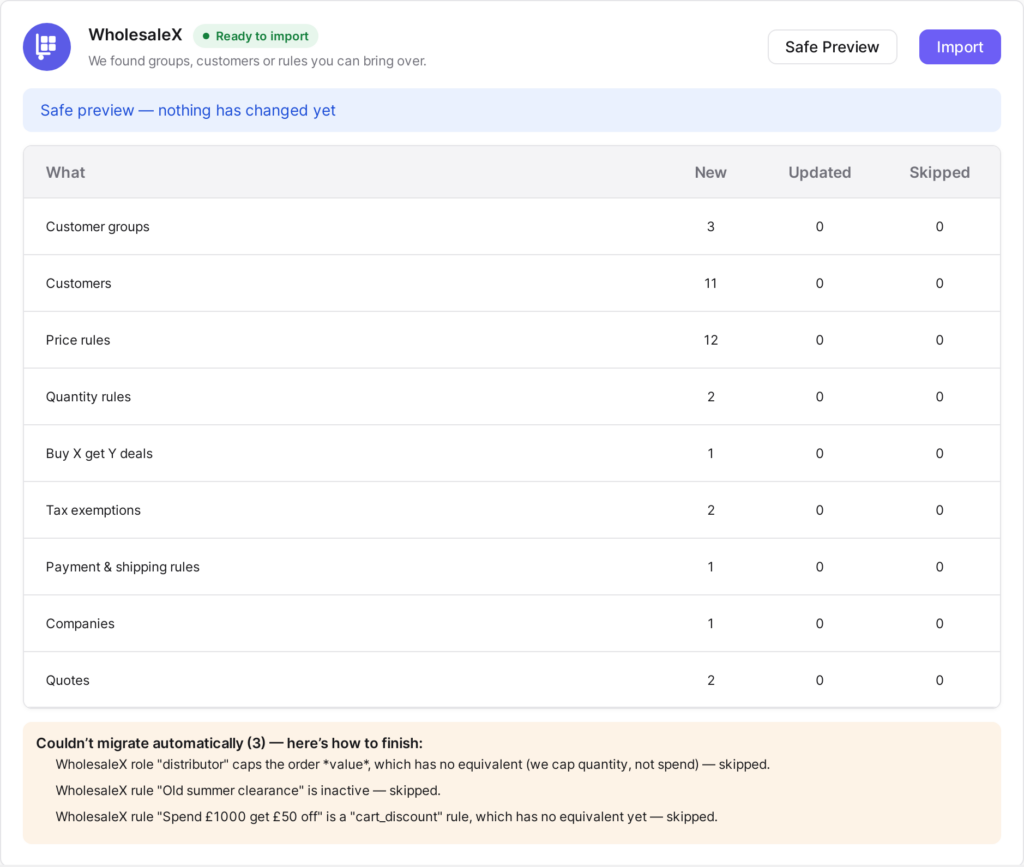
A short list can’t be migrated automatically — not because it’s hard, but because copying it blindly would be wrong. The importer flags each of these in the dry-run report:
- Wallet balances. A WholesaleX wallet is a prepaid balance your customer has topped up. B2B Suite’s credit is the opposite — an amount the customer owes you against net terms. Silently turning one into the other would misstate money, so the importer leaves it to you to set up credit terms deliberately.
- Maximum order value caps. B2B Suite caps order quantity, not spend. A max-spend limit is flagged rather than guessed.
- Per-role price visibility. WholesaleX’s show/hide rules don’t map one-to-one onto B2B Suite’s guest price-hiding, so you set your visibility rule by hand (it’s a single setting).
- Custom registration fields. Recreate any extra fields you added to the sign-up form.
- Message / conversation history. Not carried over — there’s little value in it once the quote itself has been imported.
Everything here is surfaced as a named warning with a note on how to finish it. That warning list is your manual to-do list — work down it and you’re done.
Where each WholesaleX thing lands
If you think in WholesaleX terms, here’s the quick translation. Items marked Pro are Pro features — but the importer still writes them on the free plugin now, and they switch on when you upgrade. You migrate everything today and unlock later.
| In WholesaleX | In B2B Suite | How |
|---|---|---|
| Customer roles | Customer groups | Automatic |
| Role pricing rules & tiers | Price rules | Automatic |
| Min/max quantity restrictions | Quantity rules | Automatic |
| Buy-X-get-one | BOGO rules | Automatic |
| Role tax exemption | Tax-exempt groups | Automatic · Pro |
| Sub-accounts | Company accounts & users | Automatic · Pro |
| Request-a-quote | Quotes | Automatic · Pro |
| Wallet (prepaid) | Net terms & credit | Manual |
| Price visibility rules | Catalogue visibility | Manual |
Migrate step by step
Seven steps, and steps 4–6 are the whole of it.
Step 1: Install B2B Suite (free)
Add B2B Suite for WooCommerce from WordPress.org alongside your existing setup. It won’t fight WholesaleX at this stage — you’re only reading data, not switching pricing engines yet.
Step 2: If you have more than one group, activate Pro
The free plugin ships with a single customer group. A store with several wholesale roles should run the import with Pro active so every group comes across in one pass. The dry run tells you how many roles it found either way, so you can decide before paying.
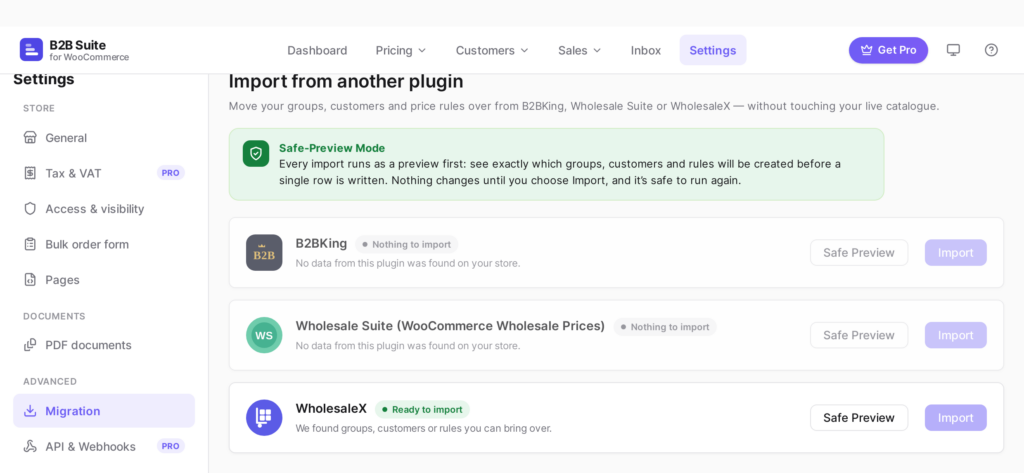
Step 3: Open Settings → Import and choose WholesaleX
Go to B2B Suite → Settings → Import. The importer detects WholesaleX’s stored data automatically. Choose it as the source and pick which roles you want to bring over.
Step 4: Run the dry run
This writes nothing. You get a full report: the groups, customers, rules, companies and quotes it will create, and a warning for every record it can’t map cleanly.
Step 5: Read the report — especially the warnings
Skim the counts first and confirm they match what you expect (for example, “5 groups, 214 customers, 38 price rules”). Then read the heads-up notices and the couldn’t-migrate list — that’s the short manual to-do list from the section above.
Step 6: Commit
Happy with the preview? Confirm, and the same import runs for real. Because it records a source-to-created map, you can safely re-run it later to pick up anything that changed on WholesaleX in the meantime.
Step 7: Switch the storefront over
Once your prices check out (next section), deactivate WholesaleX so only one plugin is resolving prices. Keep it installed-but-off for a while — that’s still your instant rollback.
Check your prices before you switch
Three checks, about five minutes, and you’ll know the migration is right before a real buyer does.
- Check a price. In Pricing → Check a price, enter a product whose trade price you already know and a customer from an imported group. The tool shows the full precedence trail — which rule won and why — so you can watch the imported rule do its job.
- View as customer. Use view-as-customer on a real imported buyer and walk the shop, cart and checkout. Confirm all three agree on the number. (B2B Suite resolves prices through one pipeline that covers both the classic checkout and Cart & Checkout Blocks, so a correct price is correct everywhere.)
- Clear the warnings. Work down the dry-run warning list and recreate the handful of items that needed a manual step. Then you’re genuinely done.
Rolling back
Because nothing was ever written back to WholesaleX, rollback is simple: deactivate B2B Suite, reactivate WholesaleX. Your old store is exactly as you left it. This is why it’s safe to run the import — even the real, committed import — on a live store: the source data is never touched.
FAQ
Does WholesaleX have to stay active during the import?
No. The importer reads WholesaleX’s data from WordPress storage directly, so it works whether the plugin is active or not. Most people leave it on until they’ve verified prices, then switch it off.
Will importing change or delete anything in WholesaleX?
Never. The importer is read-only towards WholesaleX — it only writes into B2B Suite’s own groups, rules and tables. That’s exactly why deactivating B2B Suite restores your previous setup.
Do I need Pro to migrate?
No. The importer is in the free plugin, and you can migrate and verify pricing before spending anything. Pro matters in two cases: you have more than one customer group, or you’re bringing across Pro-domain data such as companies, tax exemptions or quotes. Even then the data imports on the free plugin and activates when you upgrade.
What happens to my customers’ wallet balances?
They’re flagged, not moved. A WholesaleX wallet is a prepaid balance the customer has topped up; B2B Suite’s credit is the opposite — an amount the customer owes you against net terms. Converting one into the other would misstate money, so the importer leaves it to you to set up credit terms deliberately.
Can I import, keep selling, and re-import later?
Yes — that’s the recommended way to switch a busy store. The importer maps each source record to what it created, so a second run updates those records instead of duplicating them. Import early, keep taking orders on WholesaleX, then re-import right before you flip the storefront over.
Does the migration cover the block checkout too?
Yes. B2B Suite controls prices through one pipeline that covers both the classic checkout and Cart & Checkout Blocks, so an imported price behaves the same everywhere.
Conclusion
Migrating off WholesaleX isn’t a leap of faith. It’s a preview you approve: read your roles, buyers, prices, companies and quotes into B2B Suite, check the numbers with the tools built for it, and switch the storefront over only when you’re sure. Nothing is written back to WholesaleX, so the door back is always open.
And once you’re across, the reason you moved is waiting for you — company accounts with sub-users, spend limits and approval, net terms with a credit ledger, quotes and VAT validation — all in the same plugin, on the same pricing pipeline as the free features you just imported into.
Get B2B Suite free on WordPress.org and run the dry run on your own store today. Need help? The docs cover every setting, and support is here if you get stuck.

Comments
Leave a comment
Loading comments…